Developer Tooling & Infrastructure
Devolib — Project-Aware Development Runtime
Devolib is a browser-based development runtime that imports or scaffolds a full-stack codebase, runs it inside an isolated Docker environment, discovers how the repository is assembled, and exposes the working system—not merely its files—in one interface.
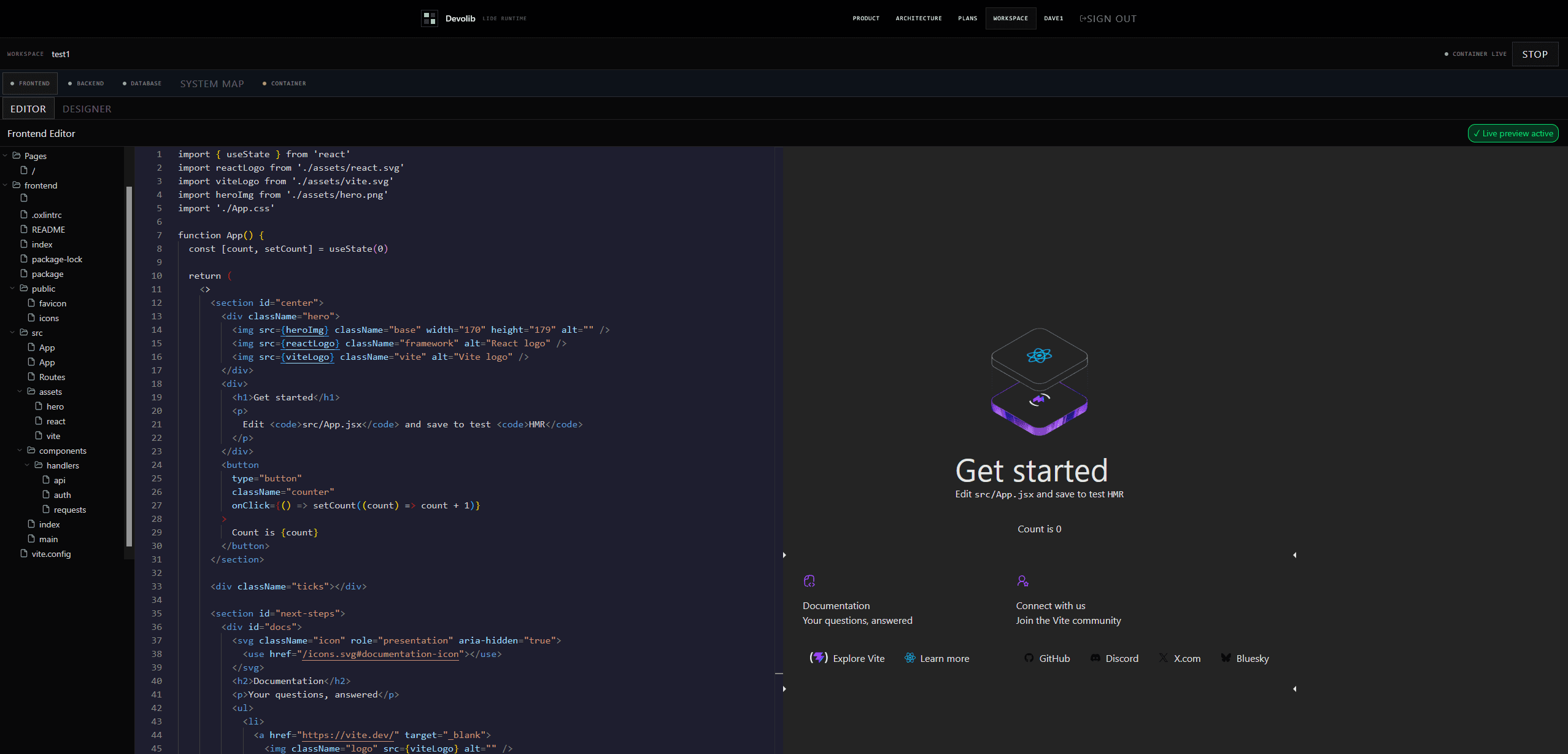
The LIDE runtime turns repository structure into an active model of pages, API endpoints, database schema, services and logs. From that model, a developer can edit code, start services, alter PostgreSQL, install packages, generate endpoint tests and preview the running frontend without leaving the workspace.
Key Features
Repository-aware imports
Clone an existing repository, install its dependencies, detect its frameworks and map pages, endpoints and file structure into project metadata.
Isolated project runtimes
Each project receives its own Docker container, persistent volume and routed frontend hostname, keeping execution and files inside a dedicated boundary.
Full-stack browser workspace
Move between Monaco-based frontend and backend editing, live preview, PostgreSQL schema controls, terminal access and dependency management.
Live structural model
Surface detected pages, API endpoints, database tables and runtime logs as a navigable view of the running application.
Generated endpoint tests
Use discovered routes as context for test generation, execute the resulting requests against the live backend and report pass or failure state in the workspace.
Service and runtime control
Start the container and its frontend, backend and database services independently while streaming status, command output and logs back to the browser.
Implementation
Go control plane
A Go service owns authenticated project operations, container lifecycle management, repository imports, metadata persistence and service execution.
Repository scanner
Filesystem traversal, dependency inspection and framework-aware extraction identify frontend and backend technologies, application pages, API routes and database dependencies.
Container and routing layer
Docker creates a named container and persistent volume per project, while Traefik labels route the running frontend to its generated hostname.
WebSocket command bus
A project-scoped WebSocket carries terminal commands, file operations, package installation, database actions, service state, test requests and streamed output.
Interactive application model
Next.js combines repository metadata with Monaco, live previews, schema management, generated tests and structured logs to represent the application as a system rather than a flat file tree.
Architecture in motion
How it works
Repository to structural model
An imported repository is cloned into its project volume, inspected for framework and dependency signals, then converted into pages, endpoints and navigable file groups for the workspace.
- GitHub repository
- Project volume
- Stack detection
- Route and file scan
- Project metadata
The scanner recognises Next.js, React, Vue and vanilla frontends; FastAPI, Flask, Express and Actix backends; and common SQL, NoSQL and Prisma dependencies.
Project to isolated runtime
The control plane resolves a prepared base image, creates the project container and volume, scaffolds or imports the codebase, installs dependencies and attaches routed frontend access.
- Project request
- Prepared base image
- Docker container
- Persistent volume
- Traefik route
Each project is assigned its own container identity, volume, service configuration and generated hostname before the runtime is stopped ready for an explicit start.
Browser to running system
The workspace sends project operations through one authenticated real-time channel and receives terminal output, service health, database schema changes and structured runtime events in return.
- Browser workspace
- Project WebSocket
- Container execution
- Services and database
- Live status and logs
The same command path supports file reads and writes, package installation, PostgreSQL operations, service startup, generated test execution and general terminal commands.
Design Choices
Model the system, not only the files
Pages, endpoints, schema, services and logs are treated as connected parts of one application so every tool can operate with project context.
One runtime boundary per project
Containers provide process isolation while named volumes preserve the working project independently of the container lifecycle.
Separate service lifecycle from container lifecycle
The environment can be running while frontend, backend and database services are started and observed individually, making failures easier to locate and recover from.